Advanced Data Provenance - Coarse-grained setup of embedded GPCR
Introduction
In this tutorial, we will go through how to set-up a coarse-grained molecular system of a PTH2R (Parathyroid hormone receptor type 2) protein embedded in a lipid bilayer membrane along with water and counter-ions. We will use the command-line tools provided in aiida-gromacs to track each step performed on the terminal.

Preparing the environment
For this tutorial, some additional software is required as well as the local installation of GROMACS and the aiida-gromacs plugin that we used in the previous tutorial. This software is best installed into the environment that aiida-gromacs and AiiDA were installed in, so begin by activating this environment. We then need to start the AiiDA database and daemon using the first three steps from our user guide. Make a new directory called PTH2R_Tutorial and navigate to it using these commands:
mkdir PTH2R_Tutorialcd PTH2R_Tutorial
Into this directory, download all the required tutorial files, including the “toppar” directory. A python script is needed to build the coarse-grained system, download this into the directory also.
Software and environment requirements
martinize2 is used to convert from atomistic to coarse-grained structures.
A modified insane script is used to build the coarse-grained system.
A local installation of GROMACS is required to perform molecular dynamics simulations.
aiida-gromacs is used to keep track of all the commands used to setup and perform the simulation.
dssp is used by
martinize2to find secondary structures in the protein.
Note
martinize2 can be installed via the link above, but please install dssp via the following commands if using Linux:
mamba install anaconda::libboost=1.73.0mamba install -c salilab dssp
And if using MacOS:
mamba install anaconda::libboost=1.73.0mamba install -c salilab dssp/osx-64::dssp
This is to ensure compatibility with aiida-gromacs; issues may occur if dssp is installed using alternative methods.
Aquiring and tidying up the receptor protein structure
Our starting point is the PTH2R structure from the GPCRdb.
First, we download the PTH2R protein from the GPCRdb using
curl. We will track our commands as we perform them using thegenericMDcommand in aiida-gromacs (note that this and all following commands use the Linux command line syntax; this will need to be adjusted appropriately if using MacOS) :PTH2R="ClassB1_pth2r_human_Active_AF_2022-08-16_GPCRdb" genericMD --code bash@localhost \ --command "curl https://gpcrdb.org/structure/homology_models/pth2r_human_active_full/download_pdb -o $PTH2R.zip " \ --outputs $PTH2R.zip
Remember to check on the success of each command using:
verdi process list -a
The Process State column of the readout generated by this command should read Finished[0] - if another number is shown, an error has occured. Tasks that have not yet completed will show as “Waiting Monitoring scheduler: job state RUNNING” - check that their status has been updated to Finished before proceeding to the next step.
We then need to
unzipthe downloaded file:genericMD --code bash@localhost \ --command "unzip $PTH2R.zip" \ --inputs $PTH2R.zip --outputs $PTH2R.pdb
Now that we have the pdb file, we can remove regions of low confidence at the start and end of the receptor chain. We use the
sedcommand to programmatically delete lines that correspond to low confidence regions between residues 1-31 and 435-550 inclusive. Don’t forget to check the edited file to make sure that the sed command has worked as expected, asverdi process list -awill only show if an executed command was succesful, not if it did what we wanted it to!genericMD --code bash@localhost \ --command "sed -i -e '1,217d;3502,4387d' $PTH2R.pdb" \ --inputs $PTH2R.pdb \ --outputs $PTH2R.pdb
Aligning PTH2R to a correctly orientated structure
Next, we download the correctly orientated structure from the OPM database.
genericMD --code bash@localhost \
--command "curl https://opm-assets.storage.googleapis.com/pdb/7f16.pdb -o PTH2R_opm.pdb " \
--outputs PTH2R_opm.pdb
PTH2R is a receptor for the parathyroid hormone and the OPM downloaded structure contains the coupled G-protein along with other bound molecules. We will keep only the receptor using the
sedcommand to remove lines that do not correspond to the receptor:genericMD --code bash@localhost \ --command "sed -i -e '2,761d;3835,13708d' PTH2R_opm.pdb" \ --inputs PTH2R_opm.pdb \ --outputs PTH2R_opm.pdb
The final step for preparing the PTH2R protein is to position the structure in the correct orientation by aligning against the structure downloaded from the OPM database. There are a few ways to orientate the protein, here we use the orientations of proteins in membranes (OPM) database structure as a template to align our protein with. The OPM structure is correctly orientated to fit around a membrane and uses the 7F16 PDB deposited structure, however, this structure has missing atoms, so we cannot use this structure directly. There is an option to use the PPM webserver to orientate the protein correctly, however, no command-line tool is currently available, so we will not use this here.
We use the
confrmscommand in GROMACS to align our structure. We will carry on usinggenericMDto track this command and use theechocommand to include the interactive options required byconfrms:genericMD --code bash@localhost \ --command "echo -e '0 | 0 \n q' | gmx confrms -f1 PTH2R_opm.pdb -f2 $PTH2R.pdb -name -one -o PTH2R_fit.pdb" \ --inputs PTH2R_opm.pdb --inputs $PTH2R.pdb \ --outputs PTH2R_fit.pdb
Building a coarse-grained system from an atomic structure
Now that we have the correct starting structure of the receptor, we move onto coarse-graining.
We use Martinize2 to coarse-grain the atomistic structure and produce a GROMACS topology file
genericMD --code martinize2@localhost --command "-f PTH2R_fit.pdb -o PTH2R_opm.top -x PTH2R_opm.cg.pdb -ff martini3001 -nt -dssp mkdssp -elastic -p backbone -maxwarn 2 -mutate HSD:HIS -mutate HSP:HIH -ignh -cys auto -scfix" \
--inputs PTH2R_fit.pdb \
--outputs PTH2R_opm.top --outputs PTH2R_opm.cg.pdb --outputs molecule_0.itp
Adding the membrane and solution around the protein with insane
Next, we use our custom insane.py python script to embed the protein into a lipid bilayer and solvate the system. Our insane script is modified from the Melo lab, it has been updated to python3 and contains additional parameters for the GM3 carbohydrate.
genericMD --code python@localhost --command "insane_custom.py -f PTH2R_opm.cg.pdb -o solvated.gro -p system.top -pbc rectangular -box 18,18,17 -u POPC:25 -u DOPC:25 -u POPE:8 -u DOPE:7 -u CHOL:25 -u DPG3:10 -l POPC:5 -l DOPC:5 -l POPE:20 -l DOPE:20 -l CHOL:25 -l POPS:8 -l DOPS:7 -l POP2:10 -sol W" \
--inputs insane_custom.py --inputs PTH2R_opm.cg.pdb \
--outputs solvated.gro --outputs system.top
Preparing the system for simulation
Once the topology file is created, we need to include all the itp files containing the force field parameters used to describe interactions between beads. Make sure that the “toppar” directory was downloaded into the working directory, PTH2R_Tutorial, or alternatively adjust the address of the toppar directory to the appropriate location in the commands given below. We use the
sedcommand again to edit thesystem.topfile directly on the command-line, to include all the itp files, and we submit this command viagenericMDas with the previous commands.genericMD --code bash@localhost \ --command "sed -i '1i #include\ \"toppar/martini_v3.0.0.itp\"\\n#include\ \"toppar/martini_v3.0.0_ions_v1.itp\"\\n#include\ \"toppar/martini_v3.0.0_solvents_v1.itp\"\\n#include\ \"toppar/martini_v3.0.0_phospholipids_v1.itp\"\\n#include\ \"martini_v3.0_sterols_v1.0.itp\"\\n#include\ \"POP2.itp\"\\n#include\ \"molecule_0.itp\"\\n#include\ \"gm3_final.itp\"' system.top" \ --inputs system.top \ --outputs system.top
We also need to rename “Protein” in this file to “molecule_0” to match the information in the other files, and remove the line “#include martini.itp” as this will clash with the martini_v3.0.0.itp file that we wish to use. To do this, we will use the sed command again:
genericMD --code bash@localhost \
--command "sed -i -e 's/Protein/molecule_0/' -e 's/#include \\\"martini.itp\\\"/\\n/' system.top" \
--inputs system.top \
--outputs system.top
We also need to edit the
molecule_0.itpfile generated from the Martinize2 step to include positional restraints on the coarse-grained beads.genericMD --code bash@localhost \ --command "sed -i -e 's/1000 1000 1000/ POSRES_FC POSRES_FC POSRES_FC /g' \ -e 's/#ifdef POSRES/#ifdef POSRES\\n#ifndef POSRES_FC\\n#define POSRES_FC 1000.00\\n#endif/' molecule_0.itp" \ --inputs molecule_0.itp \ --outputs molecule_0.itp
Ions need to be added to neutralise the system and we can construct the GROMACS
.tprbinary file containing the system configuration, topology and input parameters for the next step. We use thegmx_gromppcommand (note the underscore), which is wrapper command to rungmxvia aiida-gromacs. We have included the most populargmxcommands in aiida-gromacs, the list of these are provided here.gmx_grompp -f ions.mdp -c solvated.gro -p system.top -o ions.tpr
The
gmx_genioncommand is then used to add the ions to reach a particular salt concentration and neutralise the system. As thegenioncommand requires interactive user inputs, we can provide these in as an additional text file via the--instructionsargument. Each interactive response can be provided on a new line in the input text file. In this example, we replace solventWwith ions,gmx_genion -s ions.tpr -o solvated_ions.gro -p system.top -pname NA -nname CL -conc 0.15 -neutral true --instructions inputs_genion.txt
where inputs_genion.txt contains the following lines:
W
Lastly, we will use a
gmx_make_ndxto create new index groups for the membrane and solute consituentsgmx_make_ndx -f solvated_ions.gro -o index.ndx --instructions inputs_index.txt
where inputs_index.txt contains the following lines:
13|14|15|16|17|18|19|20|21
name 26 membrane
22|23|24
name 27 solute
q
We have built our starting configuration of an embedded protein in a lipid bilayer, hurray!
Continuing on to the MD simulation
Now that the intial system is prepared, it is sensible to first visualise the system to ensure the protein is correctly oreintated and embedded in the membrane. Use your favourite visualisation tool to view the solvated_ions.gro file. Some recommendations and tutorials for visualisation are provided below.
Visualisation tools
Your starting configuration should look something like the image below:
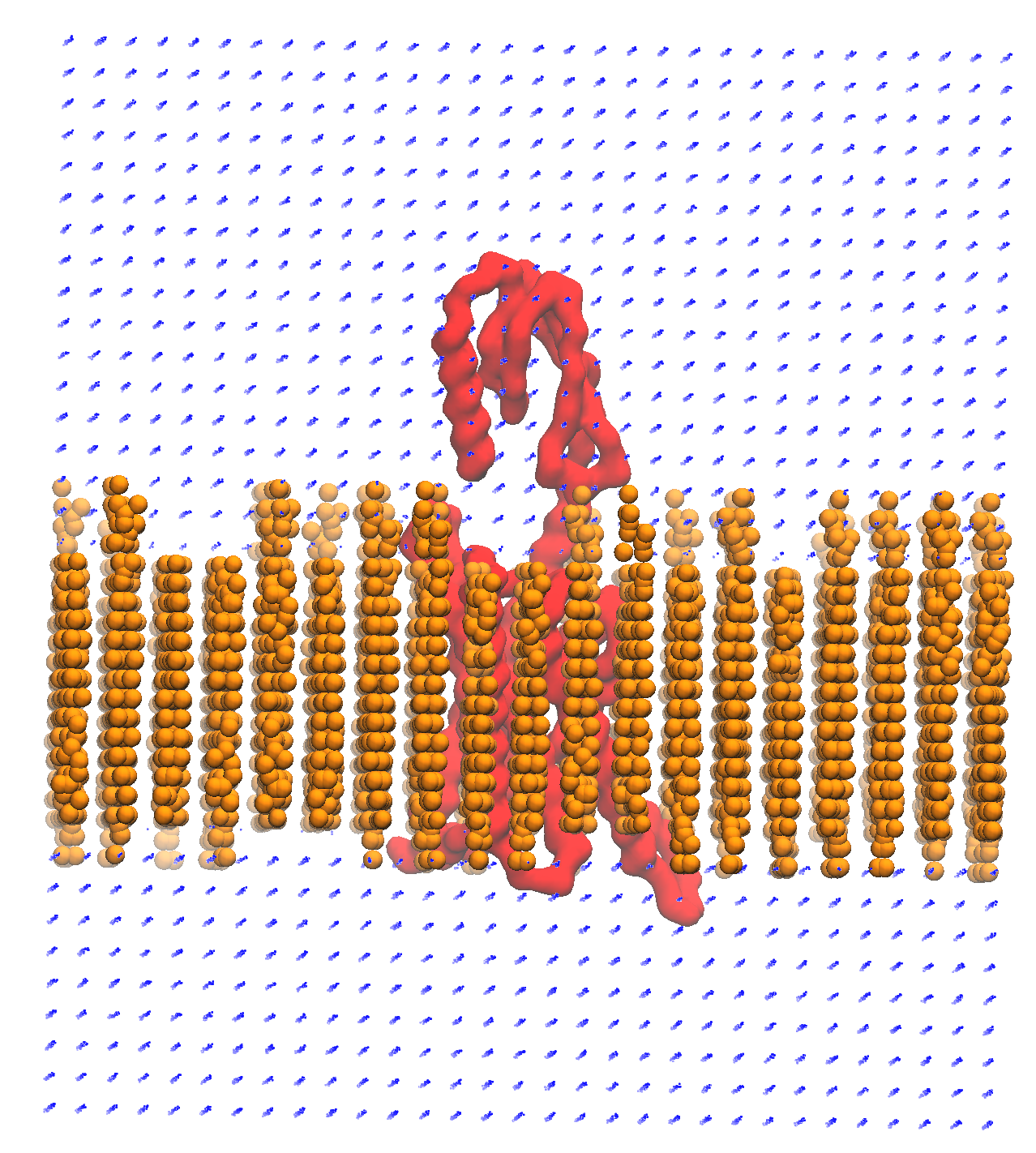
As you can see, the system is very ordered and will need to be relaxed before running a simulation. The next steps are to minimise the energy of the initial configuration and then equilibrate the system to the correct temperature and pressure. As there are many components in this system, restraints should be used to slowly relax the system without causing large structural changes.
Minimisation and equilibration steps
There are multiple stepds involved in minimising and equilibrating the simulation, the first of which is provided below.
gmx_grompp -f MDstep_1.0_minimization.mdp -c solvated_ions.gro -r solvated_ions.gro -p system.top -o MDstep_1.0_minimization.tpr -n index.ndx -maxwarn 1gmx_mdrun -s MDstep_1.0_minimization.tpr -c MDstep_1.0_minimization.gro -e MDstep_1.0_minimization.edr -g MDstep_1.0_minimization.log -o MDstep_1.0_minimization.trr
There are several more steps to perform, can you complete the rest of the simulation? If you need help, the full list of steps can be found in this bash script. Good luck!
Acknowledgements
Thanks to Kin Chao for providing the intial raw files for setting up the coarse-grained system and the input files for the GROMACS simulation.